I wanted a small failure test: start a few long-running tasks, kill the worker, then see whether the work still finishes.
This is where queue delivery and task recovery are not the same thing. A queue can hand work to a worker. Once that work is acknowledged and the worker starts running it, the queue may no longer know enough to recover it if the process dies.
Pynenc keeps that missing state in the orchestrator. A runner is the process that executes tasks. An invocation is one concrete execution of a task. While a runner is alive, it sends heartbeats. If those heartbeats stop, pynenc can find the invocations that were running on that runner and route them again.
The failure mode
Here is the failure mode this test is trying to expose:
- A task starts running on Worker-1.
- Worker-1 gets OOM-killed (or crashes, or the host dies).
- The task message was already acknowledged and removed from the queue.
- The queue has no pending message left to deliver.
- Unless some other component tracks running work, the task is lost.
Typical workarounds teams build by hand:
- Late acknowledgement, which reduces task loss but increases duplicate execution risk.
- External monitoring, which detects failures but still requires manual re-queueing.
- Strict idempotency layers everywhere, which are useful but still need a recovery trigger.
Those tools can be useful, but they do not replace a durable record of which task invocations are running and which runner owns them.
The recovery test
I ran the same crash scenario with pynenc: three tasks running, then SIGKILL, then a second worker.
STEP 1: Starting Worker-1...
  Worker-1 started (PID 12345)

STEP 2: Submitting 3 long-running tasks...
  -> Submitted slow_task(0)
  -> Submitted slow_task(1)
  -> Submitted slow_task(2)

  Waiting for Worker-1 to pick up and start running tasks...

STEP 3: Simulating a worker crash!
  X Killing Worker-1 (PID 12345) with SIGKILL...
  X Worker-1 terminated (exit code -9)

  The in-progress task is now orphaned — no worker owns it.

STEP 4: Starting Worker-2 (the recovery worker)...
  Worker-2 started (PID 12346)

STEP 5: Waiting for recovery and task completion...
  OK slow_task completed: task_0_completed
  OK slow_task completed: task_1_completed
  OK slow_task completed: task_2_completed

  ALL 3 TASKS COMPLETED SUCCESSFULLY
  Tasks from the crashed worker were recovered automatically!
Worker-1 died mid-execution. Worker-2 detected the stale heartbeat, recovered the orphaned invocations, and finished the work without a manual requeue step.
Monitoring view
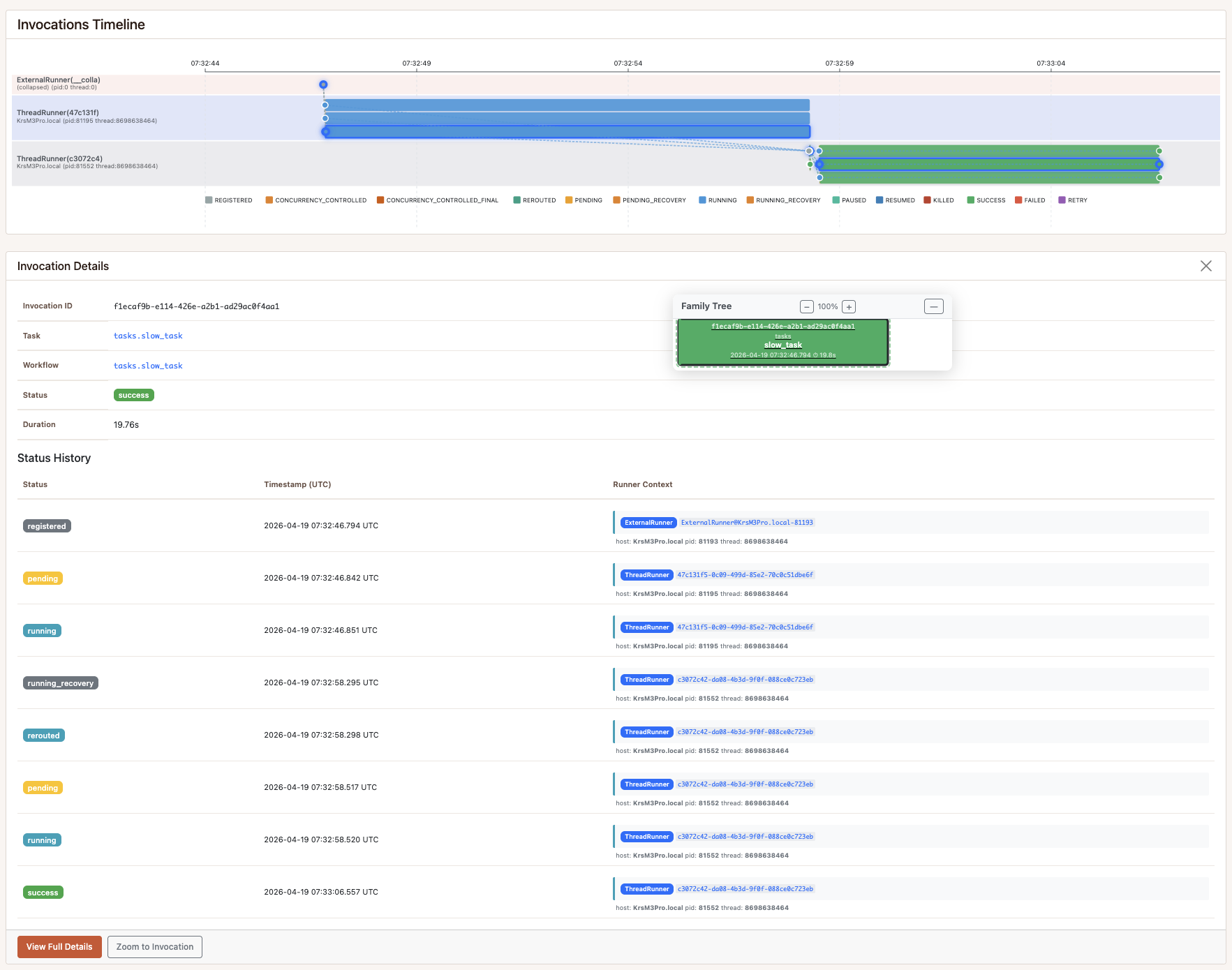
This is the same monitoring view used during the run. From here you can inspect the timeline across runners, open each invocation detail, and follow the logs around state changes to understand what happened step by step.
How recovery works
Every runner sends periodic heartbeats. As long as heartbeats arrive, the orchestrator treats the runner as alive.
When heartbeats stop:
- A scheduled recovery check sees that the runner heartbeat is stale.
- Running invocations owned by that runner become orphaned.
- The recovery step claims those invocations and routes them back to the broker.
- Healthy runners pick them up and execute them again.
This is built into pynenc’s orchestration layer. The sample does not need a separate watcher process.
Recovery re-executes the full task, so tasks that touch external systems should still be idempotent or safe to retry.
The code
The task:
# tasks.py (simplified — full version in the repo)
import time
from pynenc import Pynenc

app = Pynenc()

@app.task
def slow_task(task_num: int) -> str:
    slow_task.logger.info(f"[slow_task({task_num})] Starting — will run for 8 seconds")
    for second in range(8):
        time.sleep(1)
        slow_task.logger.info(f"[slow_task({task_num})] progress {second + 1}/8")
    return f"task_{task_num}_completed"
The demo configuration:
# pyproject.toml (key settings — full config in the repo)
[tool.pynenc]
app_id = "recovery_demo"
orchestrator_cls = "SQLiteOrchestrator"
broker_cls = "SQLiteBroker"
state_backend_cls = "SQLiteStateBackend"
runner_cls = "ThreadRunner"

# Fast recovery timeouts for demo purposes.
# Production systems use much higher values (defaults: 10 min heartbeat, 15 min recovery cron).
runner_considered_dead_after_minutes = 0.1          # 6 seconds — heartbeat expiry
recover_running_invocations_cron = "* * * * *"      # every minute (fastest cron resolution)
The full demo is in the public recovery_demo folder of the samples repository.
The entrypoint script is recovery_demo/sample.py.
Try it yourself
# Requires uv — install: https://docs.astral.sh/uv/getting-started/installation/
git clone https://github.com/pynenc/samples.git
cd samples/recovery_demo
uv sync
uv run python sample.py
The sample uses SQLite, so you can run the recovery path locally without setting up extra services.
What this replaces
| The problem | Typical approach | What pynenc does |
|---|---|---|
| Worker dies mid-task | Lost task or duplicate retries | Automatic recovery via heartbeat detection |
| Detecting dead workers | External monitoring stack | Built-in runner heartbeat checks |
| Re-queuing orphaned tasks | Manual scripts and intervention | Automatic re-routing to broker |
| Recovery across workers | Custom coordination code | Recovery check over shared invocation state |
| Understanding incidents | Manual log searches | Invocation state history and timeline views |
Project links
The recovery sample is part of the pynenc ecosystem:
Questions and failure cases are welcome in GitHub Discussions.