Most task queues are excellent at starting work. They are less opinionated about what happens when one unit of work is really a business process.
An order is not one task. It is validation, inventory, payment, shipment, notification, and sometimes compensation. If the worker fails after payment but before shipment, the answer should not be “just run the whole function again and hope every step is idempotent.”
That is the workflow problem.
Workflow systems exist because retrying a multi-step process is different from retrying one task. A useful workflow runtime has to remember decisions, reuse completed steps, keep related executions inspectable, and make failure recovery easily understandable from the monitor.
Pynenc’s workflow system is the small version of that idea. It does not ask you
to write a DAG file or move your code into a separate workflow language. A
workflow is an explicit Pynenc workflow task: ordinary tasks remain activities,
while @app.workflow functions own orchestration and replay.
@app.workflow
def fulfill_order_workflow(order: Order) -> FulfillmentWorkflowResult:
    workflow_id = fulfill_order_workflow.wf.identity.workflow_id
    fulfill_order_workflow.wf.set_data("status", "started")
    ...
This post builds a runnable order fulfillment sample and then watches it in
Pynmon. The sample lives in
samples/workflow_order_fulfillment.
Why workflows exist
Task queues give you a natural model for independent work:
resize_image.delay(image_id)
send_email.delay(user_id)
That model gets awkward when the process has durable sequencing rules:
validate order
  -> reserve inventory
  -> charge payment
  -> create shipment
  -> send confirmation
You can wire this manually with callbacks, chains, result polling, database rows, and idempotency keys. Many production systems do exactly that. The price is that the orchestration state is now spread across the queue, application tables, retry settings, and logs.
Temporal, Prefect, Airflow, Dagster, and Ray each solve parts of this with their own execution model. Pynenc’s answer is narrower: keep normal Python tasks, but add workflow identity, workflow data, deterministic operations, and recorded child task calls.
The result is useful when you want something stronger than a task chain, but lighter than adopting a separate workflow platform.
The Pynenc workflow model
Pynenc now makes the workflow boundary explicit. A top-level @app.task call is
just a standalone task invocation. A top-level @app.workflow call creates a
workflow whose id is the workflow invocation id. A child task called from inside
that workflow inherits workflow membership.
Another @app.workflow creates a sub-workflow boundary:
@app.workflow
def shipping_workflow(...):
    ...
If shipping_workflow is called inside another workflow, Pynenc records it as
a sub-workflow with a parent_workflow_id.
The workflow context is available through task.wf:
| API | Purpose |
|---|---|
task.wf.identity |
current workflow id, type, and parent workflow id |
task.wf.set_data(key, value) |
store workflow-scoped durable data |
task.wf.get_data(key, default=None) |
read workflow-scoped durable data |
workflow_task.wf.root.uuid() |
deterministic UUID for the workflow root |
workflow_task.wf.root.random() |
deterministic random value for the workflow root |
workflow_task.wf.root.utc_now() |
deterministic UTC timestamp for the workflow root |
workflow_task.wf.root.execute_task(task, *args, **kwargs) |
call a child task and record the child invocation |
The replay rule is the important one:
When the same workflow invocation is retried, deterministic root values are read back in the same order. When the workflow reaches the same child call again,
wf.root.execute_task(...)returns the already-recorded child invocation for that task and arguments.
That distinction matters. Workflow data is shared by the workflow run. Root deterministic values and child-call replay belong to the workflow-defining invocation. Ordinary child tasks can update shared workflow data, but they cannot call root-only orchestration APIs.
This is not magic checkpointing at a Python line number. The workflow function runs again. The difference is that workflow-aware operations know how to replay.
The sample: order fulfillment
The sample uses SQLite and a thread runner:
app = (
    PynencBuilder()
    .app_id("workflow_order_fulfillment")
    .sqlite("workflow_order_fulfillment.db")
    .thread_runner(min_threads=1, max_threads=10)
    .runner_tuning(
        runner_loop_sleep_time_sec=0.02,
        invocation_wait_results_sleep_time_sec=0.02,
    )
    .build()
)
There are three scenarios:
| Scenario | Outcome | What it shows |
|---|---|---|
happy |
order is fulfilled | straight-through workflow and sub-workflow |
replay |
order is fulfilled after one controlled retry | child tasks are not duplicated |
payment_failure |
order stops after payment decline | compensation task releases inventory |
The main workflow is intentionally a coordinator. It delegates side effects to step tasks:
fulfill_order_workflow
  -> validate_order
  -> reserve_inventory
  -> charge_payment
  -> shipping_workflow
       -> choose_carrier
       -> create_shipping_label
  -> send_customer_confirmation
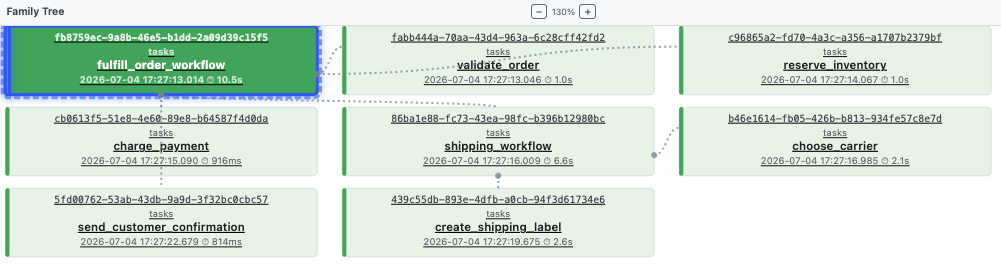
That shape is visible in Pynmon’s family tree and invocation timeline.
Step tasks stay ordinary
Here is a child task from the sample. It performs one tiny business step and records one milestone in workflow data:
import hashlib


def _stable_id(prefix: str, namespace: str, *parts: object) -> str:
    raw = "|".join(str(part) for part in (namespace, *parts))
    digest = hashlib.sha1(raw.encode()).hexdigest()[:8]
    return f"{prefix}-{digest}"


@app.task
def reserve_inventory(
    order_id: str,
    item_count: int,
    reservation_id: str,
) -> InventoryResult:
    if item_count > AVAILABLE_STOCK:
        return InventoryResult(False, reservation_id, "not_enough_stock")

    reserve_inventory.wf.set_data("reservation_id", reservation_id)
    return InventoryResult(True, reservation_id)
The task does not own replay-sensitive entropy. The workflow root creates the stable reservation id and passes it in. The child task performs the business step and writes workflow data for later inspection.
Payment is the same pattern:
@app.task
def charge_payment(
    order_id: str,
    payment_token: str,
    payment_id: str,
) -> PaymentResult:
    if payment_token == "decline":
        return PaymentResult(False, payment_id, "card_declined")

    charge_payment.wf.set_data("payment_id", payment_id)
    return PaymentResult(True, payment_id)
Business failure is returned as data. Infrastructure failure is raised as an exception.
The workflow coordinates the process
The main workflow declares an explicit workflow boundary and retries once for a controlled transient exception:
@app.workflow(
    retry_for=(TransientFulfillmentError,),
    max_retries=1,
)
def fulfill_order_workflow(order: Order) -> FulfillmentWorkflowResult:
    workflow_id = str(fulfill_order_workflow.wf.identity.workflow_id)

    attempt = fulfill_order_workflow.wf.get_data("attempt_count", 0) + 1
    fulfill_order_workflow.wf.set_data("attempt_count", attempt)
    fulfill_order_workflow.wf.set_data("order_id", order.order_id)
    fulfill_order_workflow.wf.set_data("status", "started")
Then it creates deterministic root values and executes children through the root workflow context:
validated_at = fulfill_order_workflow.wf.root.utc_now().isoformat()
validation_inv = fulfill_order_workflow.wf.root.execute_task(
    validate_order,
    order,
    validated_at,
)
validation = validation_inv.result

reservation_id = _stable_id(
    "RSV",
    "reservation",
    order_id,
    fulfill_order_workflow.wf.root.uuid(),
)
reservation_inv = fulfill_order_workflow.wf.root.execute_task(
    reserve_inventory,
    order.order_id,
    order.item_count,
    reservation_id,
)
reservation = reservation_inv.result

payment_id = _stable_id(
    "PAY",
    "payment",
    order.order_id,
    fulfill_order_workflow.wf.root.uuid(),
)
payment_inv = fulfill_order_workflow.wf.root.execute_task(
    charge_payment,
    order.order_id,
    order.payment_token,
    payment_id,
)
payment = payment_inv.result
The difference between reserve_inventory(...) and
fulfill_order_workflow.wf.root.execute_task(reserve_inventory, ...) matters.
Calling the task directly still creates a Pynenc invocation, but the workflow
does not record that call as replayable child work. Calling through
wf.root.execute_task stores the child invocation id under a deterministic call
key. On retry, the same child call returns the same invocation.
Compensation is explicit
If payment is declined, the workflow does not pretend the whole process crashed. It runs a compensating task and returns a business failure:
if not payment.approved:
    release_id = fulfill_order_workflow.wf.root.uuid()
    release_inv = fulfill_order_workflow.wf.root.execute_task(
        release_inventory,
        reservation.reservation_id,
        release_id,
        "payment_declined",
    )
    fulfill_order_workflow.wf.set_data("status", "payment_failed")
    fulfill_order_workflow.wf.set_data("failure_reason", payment.reason)
    return FulfillmentWorkflowResult(
        workflow_id=workflow_id,
        order_id=order.order_id,
        status="payment_failed",
        release_id=release_inv.result.release_id,
        failure_reason=payment.reason,
        ...
    )
This is the workflow side of the Saga pattern: when a later step rejects the process, earlier durable effects are compensated deliberately.
The trigger system can react to failures. The workflow system owns the transactional path.
Sub-workflows
Shipping is a separate workflow because it has its own internal steps:
@app.workflow
def shipping_workflow(
    order_id: str,
    reservation_id: str,
    payment_id: str,
) -> ShippingResult:
    shipping_workflow.wf.set_data("order_id", order_id)
    shipping_workflow.wf.set_data("reservation_id", reservation_id)
    shipping_workflow.wf.set_data("payment_id", payment_id)

    carrier_inv = shipping_workflow.wf.root.execute_task(
        choose_carrier,
        order_id,
    )
    carrier = carrier_inv.result

    shipment_id = _stable_id(
        "SHP",
        "shipment",
        order_id,
        carrier,
        shipping_workflow.wf.root.uuid(),
    )
    tracking_number = (
        f"{carrier[:3].upper()}-"
        f"{int(shipping_workflow.wf.root.random() * 1_000_000):06d}"
    )
    label_inv = shipping_workflow.wf.root.execute_task(
        create_shipping_label,
        order_id,
        carrier,
        shipment_id,
        tracking_number,
    )
    label = label_inv.result

    shipping_workflow.wf.set_data("shipment_id", label.shipment_id)
    shipping_workflow.wf.set_data("tracking_number", label.tracking_number)
    return label
In Pynmon, shipping_workflow appears as its own workflow run and as a child of
the parent fulfillment workflow. That is helpful when one part of a larger
business process deserves its own operational view.
Durable replay
The replay scenario intentionally raises after shipment:
if order.simulate_transient_after_shipping and not fulfill_order_workflow.wf.get_data(
    "transient_probe_raised",
    False,
):
    fulfill_order_workflow.wf.set_data("transient_probe_raised", True)
    fulfill_order_workflow.wf.set_data("status", "retrying_after_transient")
    raise TransientFulfillmentError("controlled transient failure after shipment")
The first attempt has already completed validation, inventory, payment, and shipment. The retry starts the Python function again with the same workflow id.
Because each child was called through wf.root.execute_task, the second attempt
does not create a second reservation, payment, or shipment for the same
arguments. The sample records that in its result:
=== durable replay after retry ===
  status:      fulfilled
  attempts:    2
  replayed:    validate_order, reserve_inventory, charge_payment, shipping_workflow
This is the developer experience I want from a workflow system: normal Python control flow, explicit task boundaries, and a retry path that is visible rather than mystical.
Run it
git clone https://github.com/pynenc/samples
cd samples/workflow_order_fulfillment
uv sync
uv run python sample.py
The sample pyproject.toml pins pynenc[monitor] to the TestPyPI release
0.3.1rc120.dev211, with tool.uv.sources pointing at
the named testpypi index defined at https://test.pypi.org/simple/. That
makes uv sync validate the published build rather than the local source tree.
The one-command script purges old SQLite state, starts a worker subprocess, runs all three scenarios, prints summaries, and stops the worker.
For the monitoring view, run it manually:
# Terminal 1: worker
uv run pynenc --app tasks.app runner start

# Terminal 2: scenarios
uv run python enqueue.py happy --purge
uv run python enqueue.py replay
uv run python enqueue.py payment_failure

# Terminal 3: UI
uv run pynenc --app tasks.app monitor
Open http://127.0.0.1:8000.
Monitoring with Pynmon
Pynmon reads the same durable state as the worker. The workflow pages give you three useful entry points:
/workflows/lists workflow types and run counts/workflows/runslists concrete workflow runs/invocations?workflow_id=<id>filters invocations to one workflow run
From there, open the main workflow invocation.
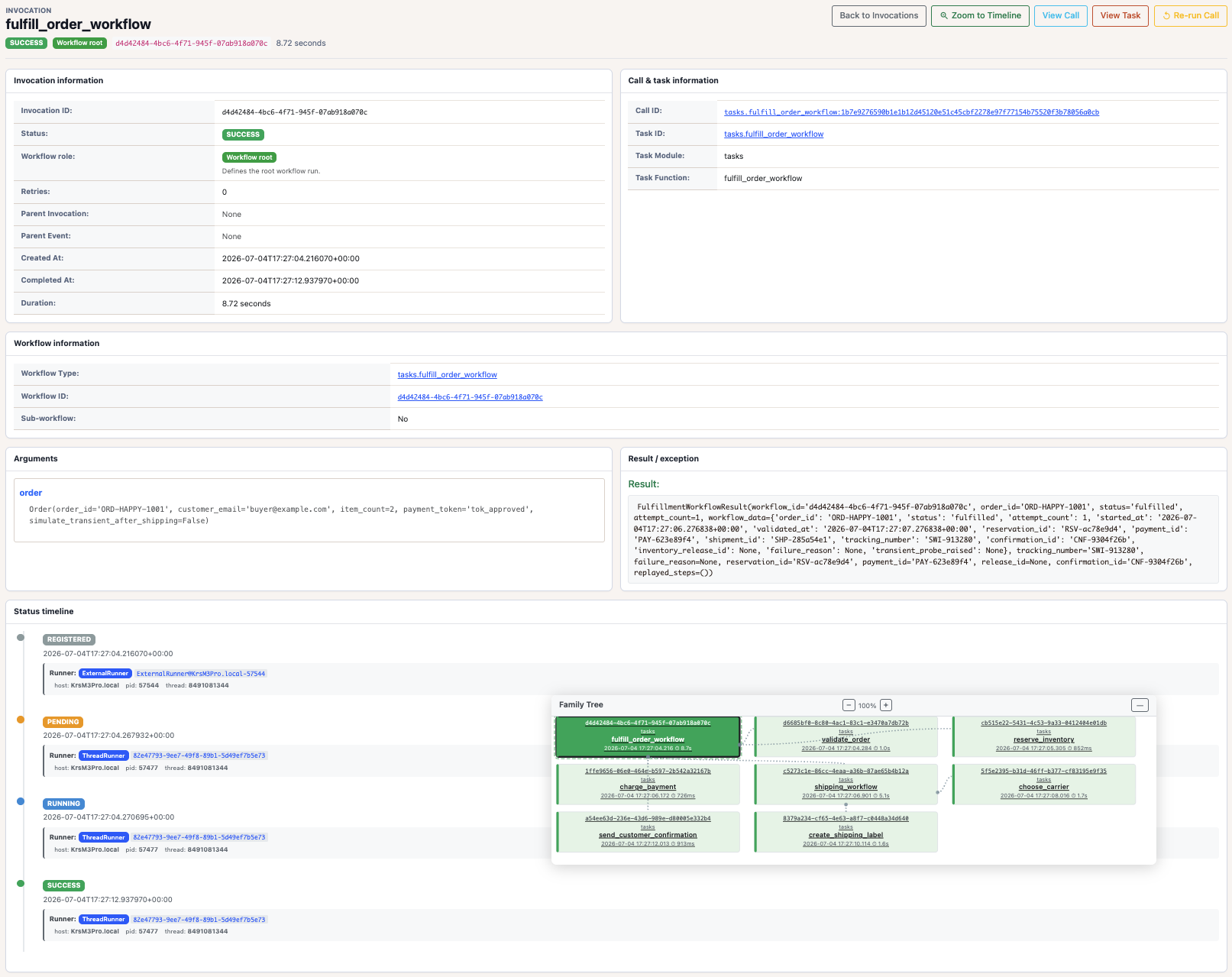
The invocation detail page shows the workflow id, arguments, result, retry
history, runner context, and family tree. In the replay scenario, the main
workflow status history contains RUNNING -> RETRY -> PENDING -> RUNNING ->
SUCCESS.
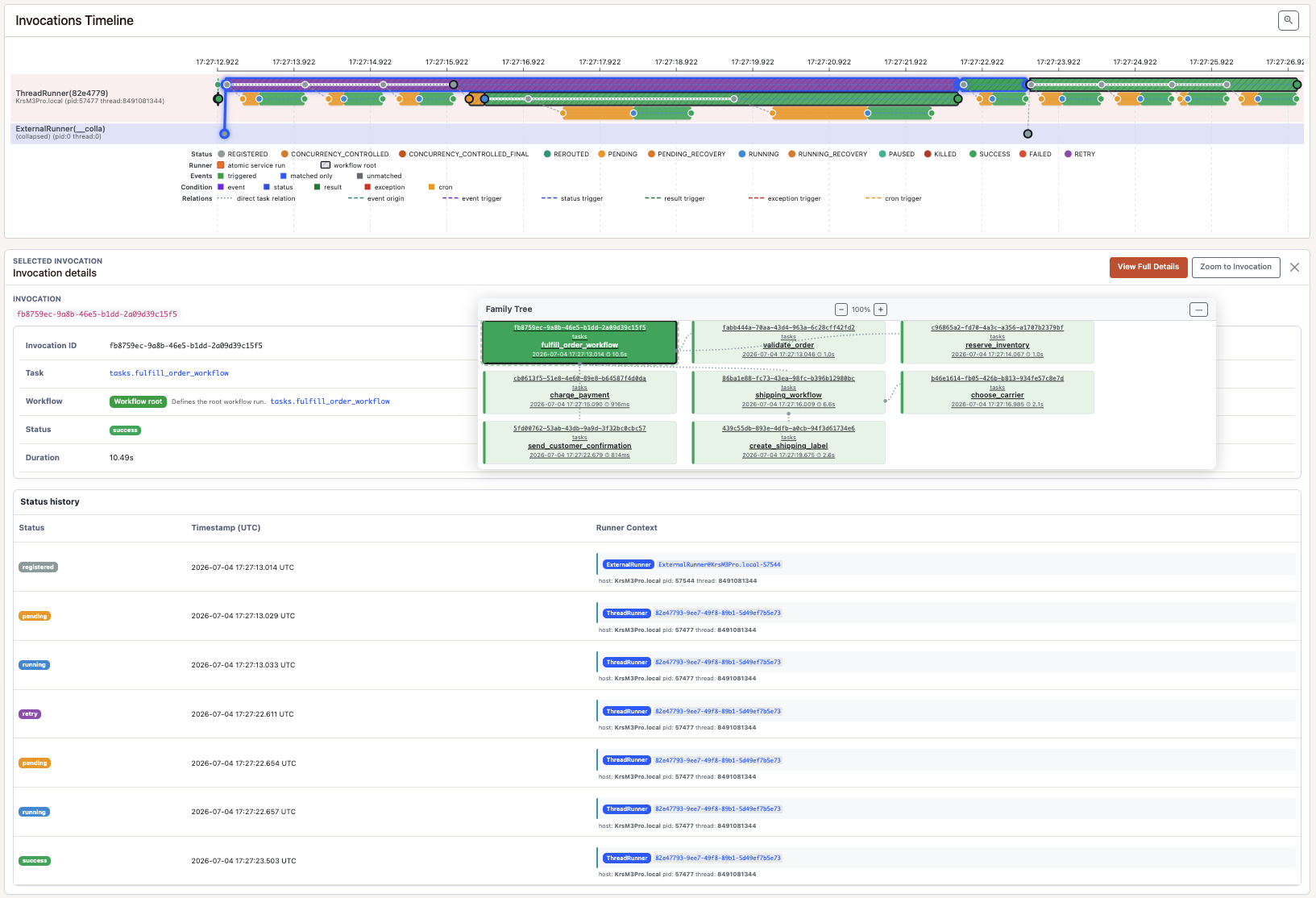
The timeline is useful for another reason: it shows that the second attempt does not rerun the earlier child tasks. You see the retry on the parent workflow, then only the tasks after the failure point.
The family tree gives the structural view: parent workflow, step tasks, nested shipping workflow, and shipping child tasks.
The important operational habit is to move between these views:
- Start from
/workflows/runs. - Open the suspicious workflow id.
- Check status history for retry or failure.
- Open the family tree to see which child steps exist.
- Filter invocations by
workflow_idwhen you need the table view.
That is much nicer than reconstructing the process from worker logs and a pile of task identifiers.
A note on determinism
Deterministic workflow code is not the same as “everything is magically safe.” You still have to write stable orchestration code.
Good workflow code:
- uses
wf.root.uuid(),wf.root.random(), andwf.root.utc_now()for values that must replay when the current invocation is retried - stores business decisions in workflow data
- calls side-effecting children through
wf.root.execute_task - keeps child task arguments stable across retry when it wants replay
- adds a distinct argument when two calls to the same child task must create two independent side effects
This last point is easy to miss. wf.root.execute_task keys replay by the child
task and arguments. Two identical child calls mean “give me the same recorded
child invocation.” If you need two independent side effects, pass an argument
that makes each call distinct.
What this replaces
| Problem | Manual task-queue approach | Pynenc workflow approach |
|---|---|---|
| Remembering the current step | Application table or log convention | wf.set_data("status", ...) |
| Stable IDs/timestamps on retry | Custom idempotency keys | wf.root.uuid() and wf.root.utc_now() |
| Avoiding duplicate child side effects | Handwritten dedupe per task | wf.root.execute_task(...) child replay |
| Grouping related task runs | Naming conventions and log search | workflow id in state and Pynmon |
| Nested process visibility | More custom correlation ids | sub-workflows with parent workflow id |
Celery users can think of this as moving orchestration state out of callback wiring and into the task runtime. Temporal users will recognize the durable execution shape, but Pynenc keeps the surface smaller and tied to its task system rather than a separate workflow service.
What workflows are not
Pynenc workflows do not remove the need for idempotent external integrations. If a child task charges a real card and then the process dies before the result is stored, your payment integration still needs a provider-side idempotency key. Workflows reduce accidental duplication inside Pynenc; they do not make external systems transactional.
They also are not the trigger system. Triggers answer “when should this task start?” Workflows answer “how should this multi-step process run and replay?” Those two features compose, but they solve different problems.
Finally, user-facing pause/resume is not a workflow feature yet. The current workflow APIs are identity, data, deterministic operations, child execution, and workflow boundaries.
Where to use this
Workflows are a fit when the shape of the process matters:
- order fulfillment
- customer onboarding
- document approval
- multi-step billing
- report generation
- data products with durable intermediate steps
- operational runbooks that need visible recovery
They are probably not worth it for a single independent background job. A plain Pynenc task is still the right tool for that.
The sample is intentionally small, but it exercises the pieces that matter in production: durable state, deterministic replay, child task reuse, sub-workflow boundaries, compensation, and monitoring.
That is the sweet spot for Pynenc workflows. You keep writing Python functions, but the process finally has a durable shape you can reason about.
Sample: https://github.com/pynenc/samples/tree/main/workflow_order_fulfillment.