One queue is enough until it is not.
At some point a nightly report should not block a refund. A payment worker should not accidentally drain reporting jobs. And if a queue has pending work but no worker, the monitor should make that obvious.
Pynenc now models that directly:
- tasks choose one queue
- broker config declares queues and priority rules
- runners choose which queues they consume
- Pynmon shows queue and invocation state
The complete runnable sample lives in
samples/broker_queue_priority_demo.
It pins the published pynenc[monitor]==0.4.0 package from PyPI.
The App
The sample uses three queues:
default  -> send_email
payments -> charge_card, refund_customer
reports  -> build_report
Here is the full shape:
from pathlib import Path

from pynenc import PynencBuilder

DB_PATH = Path(__file__).with_name("broker_queue_priority_demo.db")
EXECUTIONS: list[str] = []

app = (
    PynencBuilder()
    .app_id("broker_queue_priority_demo")
    .sqlite(str(DB_PATH))
    .thread_runner(min_threads=1, max_threads=1)
    .custom_config(
        queues=("default", "payments", "reports"),
        priority_rules=(
            {"task_id": "tasks.charge_card", "priority": 50.0},
            {"task_id": "tasks.build_report", "priority": -10.0},
        ),
    )
    .logging_stream("stdout")
    .logging_level("info")
    .logging_colors(False)
    .argument_print_mode("truncated", truncate_length=80)
    .build()
)


def record(label: str) -> str:
    EXECUTIONS.append(label)
    return label


@app.task
def send_email(message_id: str) -> str:
    send_email.logger.info(f"Sending email message={message_id}")
    return record(f"email:{message_id}")


@app.task(queue="payments")
def charge_card(order_id: str) -> str:
    charge_card.logger.info(f"Charging card order={order_id}")
    return record(f"charge:{order_id}")


@app.task(queue="payments", priority=100.0)
def refund_customer(order_id: str) -> str:
    refund_customer.logger.info(f"Refunding customer order={order_id}")
    return record(f"refund:{order_id}")


@app.task(queue="reports")
def build_report(report_id: str) -> str:
    build_report.logger.info(f"Building report report={report_id}")
    return record(f"report:{report_id}")
That is the whole feature:
send_emailuses the default queuecharge_cardgoes topaymentsand receives priority50.0from configrefund_customergoes topaymentsand overrides priority directlybuild_reportgoes toreportsand receives priority-10.0from config
A task belongs to exactly one broker queue.
Priority Is Local To A Queue
Pynenc priorities are public float values from -100.0 to 100.0. Higher
values run first, but only inside the queue being consumed.
For the payments queue:
refund_customer priority 100.0
charge_card     priority 50.0
So the refund runs before normal charges.
Priority is not global across every queue. A runner chooses a queue first, then the broker returns the highest-priority invocation inside that queue.
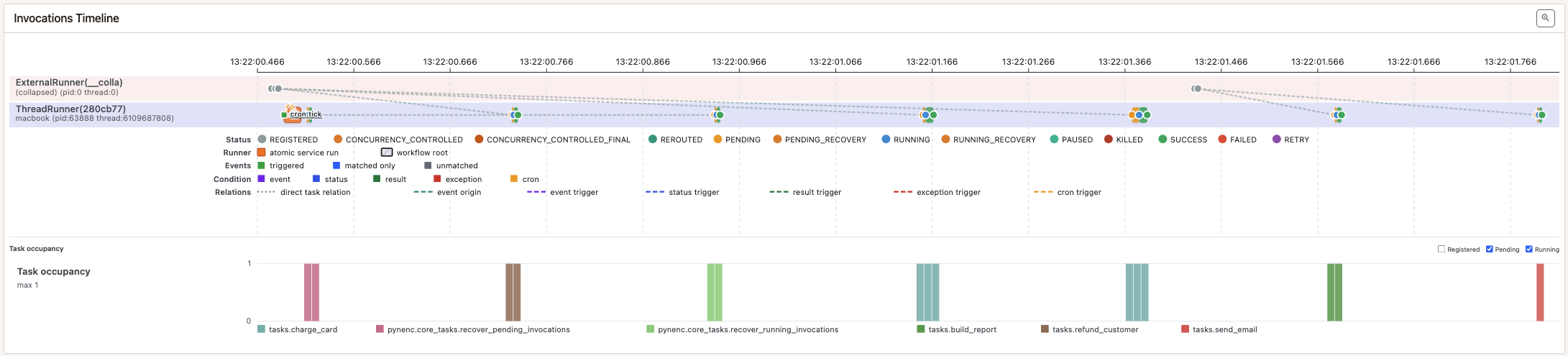
This is the behavior the sample makes easy to inspect. The payment invocations
are registered before the runner starts, and the higher-priority
refund_customer invocation is selected before the normal-priority
charge_card invocations even though it was registered last. Queue priority is
local: Pynenc does not promise one global ordering between payments,
default, and reports.
Run The Sample
From samples/broker_queue_priority_demo:
uv sync
uv run python sample.py
The script starts one local ThreadRunner, enqueues two charges and one refund,
waits for real task results, and verifies that the refund ran first. Then it
runs one default task and one report task.
The output includes Pynenc routing/status logs plus the task logs:
... NEW task:tasks.refund_customer ...
... invocation:... status:running
... Refunding customer order=order-3
... invocation:... status:success
Payment execution order: refund:order-3 -> charge:order-1 -> charge:order-2
Other task results retrieved: email:welcome -> report:daily
Payments queue ran refund before normal charges.
Default and reports queues were also consumed by the same runner.
Open Pynmon to inspect completed invocation histories.
You may also see Pynenc’s built-in recovery tasks in the logs or timeline. They are registered by the runner as part of normal maintenance and do not change the queue-priority guarantee being demonstrated here.
Inspect With Pynmon
After the sample finishes:
uv run pynenc monitor
Open http://127.0.0.1:8000. The invocations timeline should show real
execution histories, including PENDING, RUNNING, and SUCCESS states.
You may also see Pynenc’s built-in recovery tasks; the local runner executes
one normal service tick while it is running the sample work.
The runner page will not show an active runner after sample.py exits. That is
expected: the sample starts a local runner thread and stops it before returning.
The broker page should show an empty queue because all sample work was consumed.
Dedicated Workers
In production you normally keep workers running as separate processes. By default, a runner consumes all configured queues:
uv run pynenc --app tasks.app runner start
To dedicate a worker to one queue, configure the runner queues:
PYNENC__CONFIGRUNNER__QUEUES=payments uv run pynenc --app tasks.app runner start
That worker only consumes payments. A separate reports worker can be started
the same way:
PYNENC__CONFIGRUNNER__QUEUES=reports uv run pynenc --app tasks.app runner start
Backend Notes
Queues and priority are part of the broker contract, so application code stays the same across backends:
- memory keeps local per-queue priority order for tests
- SQLite stores queue and priority columns in its broker table
- Redis stores per-queue priority structures
- MongoDB stores queue and priority metadata in broker documents
- RabbitMQ maps Pynenc’s
-100.0..100.0public priority range to its native message priority internally
The useful bit is small: tasks say where work belongs, workers say what they consume, and Pynmon shows what happened.